
Q.I use a NETC02-CC. How can I write data using the command selection method?
Use the following procedure to write data from the host PLC to the driver.
- ①
- Set the Data in NETC02-CC
- ②
- Write the Set Data to the Driver
- ③
- Finish Writing
The following is a detailed description of the above procedure flow, based on the following conditions.
-
- Products to use
- AZ Series
-
- address number
- Address number 0
-
- Operation data No. 0 position data
- 1,000 steps
The remote I/O and remote register table used in this description refers to the "Address Calculation for NETC02-CC" screen in the Technical Support Tool.
① Set Data in NETC02-CC
Set the values for the command code, address number, data (Upper), and data (Lower) in the remote register.
Set the command code to 1200h (position No. 0) and the address number to 0h (unit 0). Set 1000 (1,000 steps) for the data.
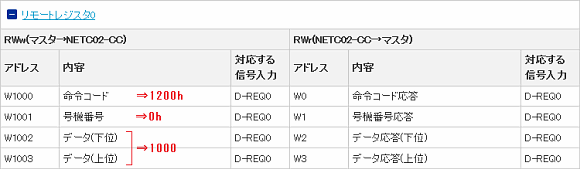
② Write the Set Data to the Driver
Turn the remote I/O D-REQ input to ON and execute writing to the driver.
When D-REQ0 is ON, D-END0 output is turned ON. The value will simultaneously be reflected in the remote register RWr.
At this time, confirm that the status of D-ERR remains OFF.
When an error occurs, D-END and D-ERR will both turn ON at the same time.

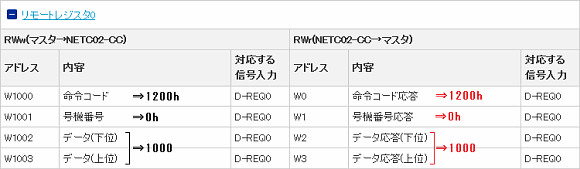
③ Finish Writing
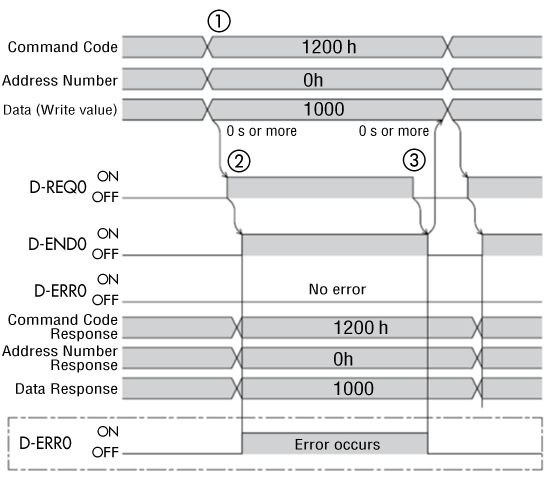
After confirming that D-END is ON in ②, turn D-REQ input to OFF.
D-END will turn OFF and the writing process is complete.

Repeat the procedure in steps ① through ③ to write data again.
Timing Chart for the above Procedure
Product Category: Controller and network compatible products
Model and Series: NETC02-CC
Description: How to Use/Setting Method
FAQ No.: 470
Related FAQs
-
- Q461.
- NETC02-CC has two methods for writing data: the command selection method and the command fixation method. How should I use them?
-
- Q462.
- Using the NETC02-CC, how can I rewrite multiple sets of data simultaneously using the command selection method?
-
- Q469.
- I use a NETC02-CC. How can I monitor the feedback position using the command selection method?
After opening the email, we will check the contents and contact you. Please note that depending on your inquiry, we may call you back.