
Q.I use a NETC02-CC. How can I write data using the command fixation method?
Use the following procedure to write data from the host PLC to the driver.
- ①
- Set the Data in NETC02-CC
- ②
- Write the Set Data to the Driver
- ③
- Next, set the data
The following is a detailed description of the above procedure flow, based on the following conditions.
-
- Remote Register Arrangement Settings
- 4 word arrangement
-
- Products to use
- AZ Series
-
- address number
- Address number 0
-
- Operation data No. 0 position data
- 1,000 steps
The remote I/O and remote register table used in this description refers to the "Address Calculation for NETC02-CC" screen in the Technical Support Tool.
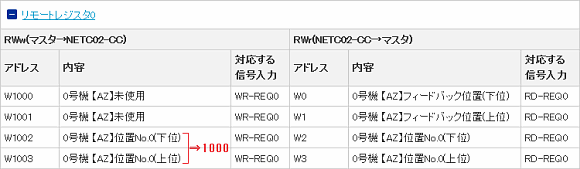
① Set Data in NETC02-CC
Set 1000 (1,000 steps) for the remote register data.
 ② Write the Set Data to the Driver
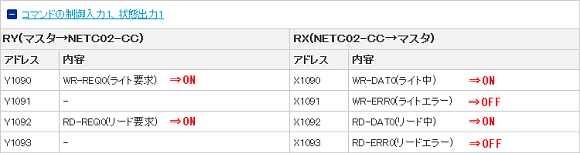
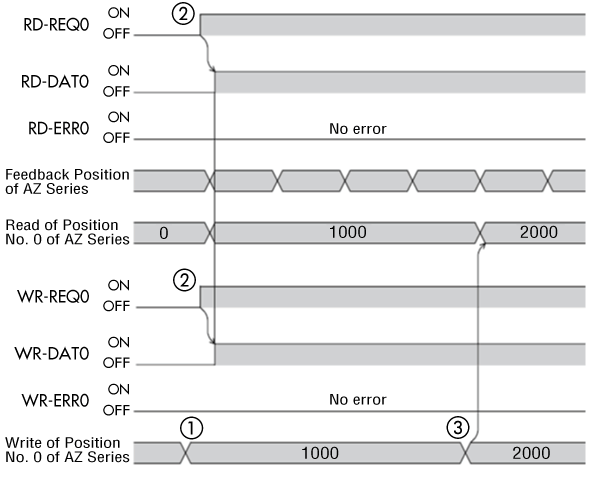
Turn the remote I/O WR-REQ input (write request) and RD-REQ input (read request) to ON.
The value set in ① is written when WR-REQ0 is ON.
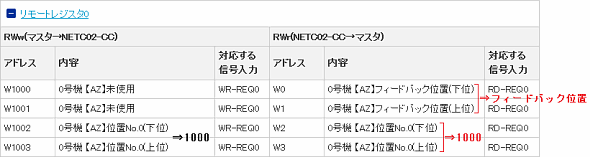
When RD-REQ0 is ON, the written data is read and feedback position (Position actual value) monitoring begins.
At this time, confirm that the status of WR-ERR (RD-ERR) remains OFF.
When an error occurs, WR-DAT (RD-DAT) and WR-ERR (RD-ERR) will both turn ON at the same time.
③ Next, Set the Data
To write data again, leave WR-REQ input ON and continue to set data. Values will be written immediately.
Timing Chart for the above Procedure
Product Category: Controller and network compatible products
Model and Series: NETC02-CC
Description: How to Use/Setting Method
FAQ No.: 471
Related FAQs
-
- Q461.
- NETC02-CC has two methods for writing data: the command selection method and the command fixation method. How should I use them? | FAQ Search
-
- Q463.
- Although I am using the NETC02-CC with the command fixation method, I want to monitor the alarm code and feedback speed. Can the contents of the register arrangement of the command fixation method be changed? | FAQ Search
After opening the email, we will check the contents and contact you. Please note that depending on your inquiry, we may call you back.