
Q.Using the NETC02-CC, how can I rewrite multiple sets of data simultaneously using the command selection method?
The following is an example of writing four data simultaneously.
The table of remote registers and remote I/O used in the explanation refers to the screen of the technical support tool "Address Calculation for NETC02-CC
-
Set the instruction code, unit number, data (lower), and data (upper) in the remote register
[Setting Example: Writing position data for all four positions (No. 0 to 3) simultaneously in the AZ Series]
Set the address (1200h~1203h) of the position data for No. 0~3 in the command code.
Next, set address number 0 (0h) as the address number and set the data to be set as the data.
In this example, the position data is set to 1,000 steps (3E8h).
-
Simultaneously turn ON the D-REQ for the remote I/O corresponding to each remote register
When D-REQ is turned ON, D-END is also turned ON.
Also, when data is successfully written, D-ERR will turn OFF.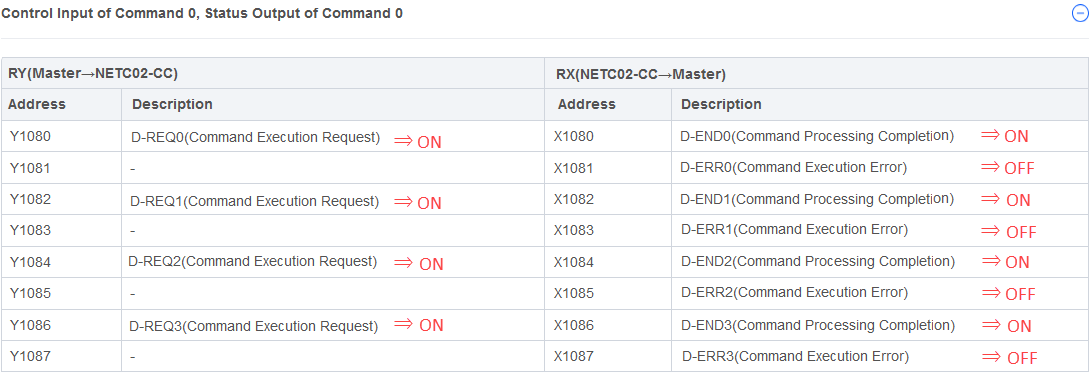
-
Confirm that D-END is ON, and then turn OFF D-REQ
When D-REQ turns OFF, D-END also turns OFF.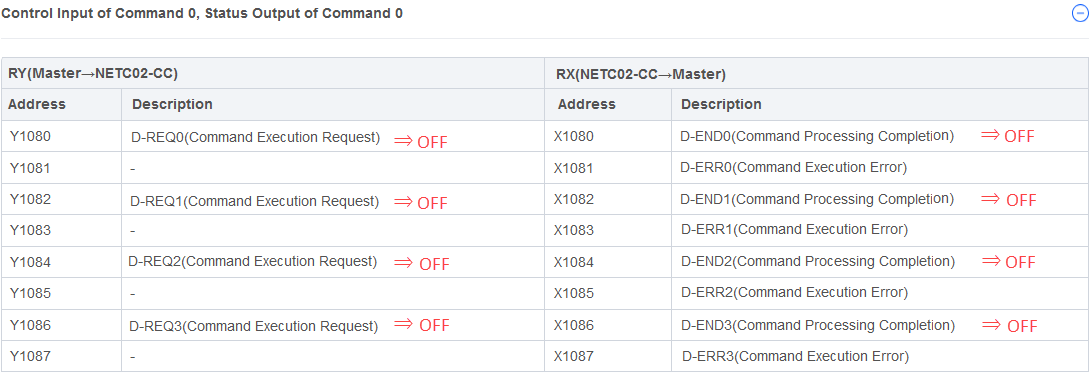
To continue rewriting the data, repeat steps 1.~3.
The upper limit of data that can be rewritten at once
The number of data sets that can be rewritten at one time depends on the extended cyclic setting.
For details, please refer to the table below.
| Extended Cyclic Settings | Number of Remote Register* | Number of Data Sets that Can be Rewritten at Once |
|---|---|---|
| 2 times | 32 | 8 |
| 4 times | 64 | 16 |
| 8 times | 128 | 32 |
- *For each data, you need four remote registers: instruction code, unit number, data (lower), and data (upper).
Product Category: Controller and network compatible products
Model and Series: NETC02-CC
Description: How to Use/Setting Method
FAQ No.: 462
Related FAQs
After opening the email, we will check the contents and contact you. Please note that depending on your inquiry, we may call you back.